Prepare returns, reconcile input tax credit, review liabilities, authenticate with the GST portal, and track filing status—inside one guided workspace.
OTP-based GSTN accessBook-to-portal reconciliationExports for review
subcidys.com/client/gst-dashboard
Review status
Return data prepared
Portal connection
GSTN session ready
The complete workspace
Every return has context. Every number has a trail.
Subcidys connects return preparation with the transactions behind it, so GST work becomes a review process—not a monthly data-entry project.
Verified GST workflow
Two data streams. One reviewed GSTR-3B.
Outward liability and inward ITC are prepared on separate tracks. GST brings the relevant values together in GSTR-3B, where you review the summary, offset liability, make any required cash payment, and authorise filing.
Start in the compliance dashboard
Select the GSTIN, financial year, and return period
Check return status and alerts, then authenticate the GST portal when a sync or filing action requires it.
Shared setup
Outward-supply track
Prepare and file GSTR-1
Sales invoices, credit/debit notes, exports, B2B/B2C documents, and HSN summaries build the outward-supply return.
01
Overview
Review included and excluded sales documents.
02
Summaries
Verify taxable value, tax, and return sections.
03
Filing portal
Authenticate, push, resolve feedback, and file.
Result: reviewed outward-liability values for the period
Inward-supply & ITC track
Review IMS and GSTR-2B
GSTR-2A supports purchase visibility; IMS actions affect eligible supplier records; the static GSTR-2B is then reconciled against your purchase register.
01
Inspect
Use GSTR-2A and local purchases to investigate records.
02
Act in IMS
Accept, reject, or keep applicable records pending.
03
Reconcile 2B
Match the static statement and confirm eligible ITC.
Result: reviewed eligible-ITC values and an exception trail
Values converge for review
GSTR-3B workspace
Review liability, ITC, payment, and filing
Final taxpayer review required
01
Overview
Review outward, reverse-charge, inter-state, ITC, exempt, nil, and non-GST sections.
02
Offset liability
Apply available IGST, CGST, and SGST credit against the period liability.
03
GST payment
If cash is required, pay on the portal and record challan details for tracking.
04
Filing portal
Push the summary, complete EVC OTP authorisation, and retain the GSTN result.
Track pending/filed status, portal responses, and available acknowledgement details.
Filing trail retained
GSTR-1/1A supports outward-liability auto-population in GSTR-3B, while GSTR-2B supports eligible-ITC and applicable reverse-charge fields. Auto-populated values remain subject to taxpayer verification.
subcidys.com/client/gst-dashboard
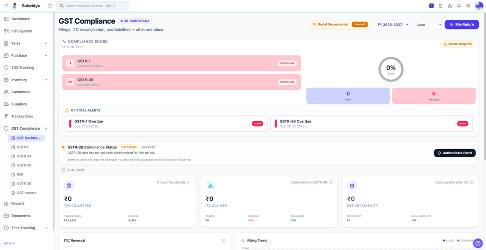
Compliance cockpit
Know what needs attention before a due date does.
Choose a financial year and month to see returns in scope, filing state, alerts, portal session, ITC position, and tax liability in one dashboard.
Return-level pending and filed status
Compliance alerts for the selected period
Books, ITC, and liability summaries
Portal session and synchronisation controls
Review before action
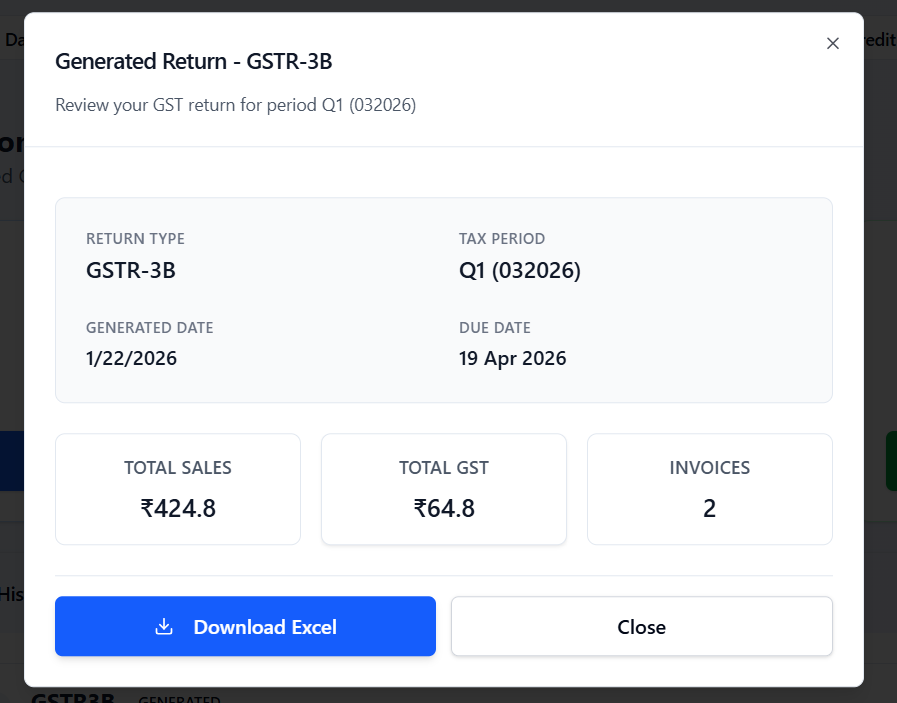
Generated summaries that are made to be checked.
Inspect return type, tax period, generation date, sales, tax, and invoice totals before downloading an Excel workpaper or continuing the portal workflow.
Generated from live books
Excel-ready output
Human review checkpoint
Retainable workpapers
subcidys.com/reports/gstr-3b
Controls that matter
Automation with clear checkpoints.
GST filing carries real consequences. The workspace accelerates preparation while keeping review, authorisation, and portal response visible.
Your final declaration stays in your control
Period-wise compliance cockpit
See return status, due-date context, portal connectivity, and current-period work without jumping between spreadsheets.
Exception-led reconciliation
Focus on mismatched GSTINs, invoice values, tax amounts, missing-in-books, and missing-on-portal records.
Secure GSTN authentication
OTP-based portal sessions keep GST credentials out of the monthly copy-paste loop and expose session status clearly.
Reviewable filing trail
Track pending and filed returns, portal responses, generated summaries, and exportable workpapers for your records.
Questions, answered
What finance teams usually ask.
A practical view of what the module does—and where taxpayer review still matters.
The workspace uses GST-ready transactions already recorded in Subcidys—such as sales invoices, purchase vouchers, credit/debit notes, tax ledgers, and organisation GST details. You choose the period, generate the relevant return view, and review the result before any portal action.
Make your next GST period calmer.
Keep books, reconciliation, returns, and portal progress connected from day one.